Railroad Automation (RRA) is a command and control software package, for DCC (Digital Command Control) model railroads, specifically designed to work with the
Loconet network bus.
Runs on Microsoft's .NET framework stack supported by Windows 7 and above.
Where other command software will pin you down to a specific way of operating your layout, RRA frees your creativity by allowing any automation behavior
to be built through its unique scripting system. Primitive layout objects and operational switchboards will still be easily built through a modern and user
friendly interface.
RRA's architecture was also designed with third party developers in mind. This was accomplished by componentizing the application into distinct
layers so consumers can choose the level of usability vs. flexibility.
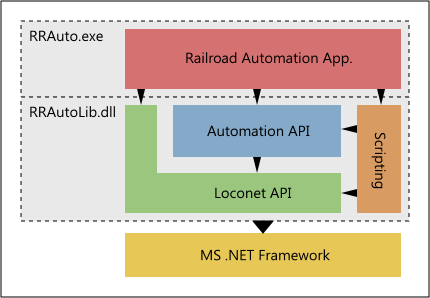
The simplest and most common way to use RRA is to install the full application, build a layout using its user interface, script operation behavior with the
built in script editor, and run the railroad through its various controls. However, for those who wish to build their own application using some or all of
RRA's features, the standalone class library RRAutoLib.dll, and its dependencies, are available to code against. It exposes all the same
internals the full application uses, minus the interface.
The Automation API, contained in namespace RRAutoLib.CTC, is the engine for Centralized Traffic Control operations, providing
high level railroad objects such as: blocks, routes, sensors, switches, engines, etc. It abstracts the Loconet communication layer so you don't have to
deal with it directly.
The Loconet API, contained in namespace RRAutoLib.Loconet, is a lower level library providing basic packet communication to/from Loconet.
This can be used directly if the need is just an easy way to interface with the Loconet network.
The scripting engine, accessible from the full application, has total access to all library functions, so in most cases it will be easier to use that,
for customizations, over developing projects entirely from scratch.